
Hullabaloo3.1 - App Store
You'll be able to see results in few seconds.
Publisher Description
NEW UPDATE AVAILABLE. ALL CRASHES FIXED! - Help keep apps free, please update your reviews.
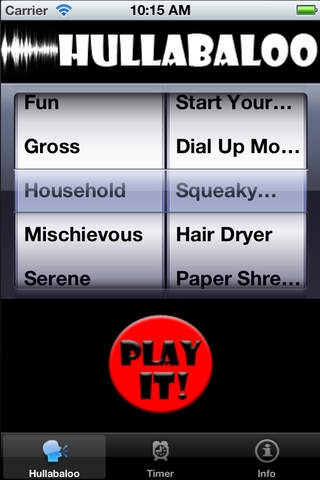
Hullabaloo is the ultimate Digital Sound Machine for your iPhone or iPod Touch! Bringing you over 30 unique sounds and endless laughs for everyone within hearing distance. This is simply the best joke machine for every occasion. Packed with the HIGH QUALITY sounds you want. When there just aren t the words to describe it .there s Hullabaloo!
Set any sound on a timer. Great for pranks, freaking out friends, or just adding some fun to any meeting.
Motion Activated! Select a sound and swing your iPhone/iPod in a slapping motion coming to an abrupt stop and the selected sound will play. Be careful not to let go!!
Simply put Hullabaloo is absolutely hilarious! Finally a noisemaker that everyone can enjoy.
______________________________________________________
Choose many sounds from the following categories:
Barnyard
Gross
Mischievous
Fun
Serene
Just some of the amazing sound effects include:
Group Applause
Snoring
Burping
Police Sirens
Group Laughter
Screaming
Kissing
Yawning
Breaking Glass
Farting
Vomiting (very gross)
Gun Shots
Slapping
Bomb Explosion
Machine Gun Shots
Crack the Whip!
Thunder Claps
Pouring Rain
Ocean Waves
Pigs
Goats
Cows
and many more!
Get this now while it s FREE. We will be adding to the Hullabaloo sound library frequently. Let us know about the sounds you want and we ll do our best to get them!
Requires iOS 5.1 or later. Compatible with iPhone, iPad, and iPod touch.
About Hullabaloo
The company that develops Hullabaloo is Peter Trennum. The latest version released by its developer is 3.1.
To install Hullabaloo on your iOS device, just click the green Continue To App button above to start the installation process. The app is listed on our website since 2009-03-06 and was downloaded 0 times. We have already checked if the download link is safe, however for your own protection we recommend that you scan the downloaded app with your antivirus. Your antivirus may detect the Hullabaloo as malware if the download link is broken.
How to install Hullabaloo on your iOS device:
- Click on the Continue To App button on our website. This will redirect you to the App Store.
- Once the Hullabaloo is shown in the iTunes listing of your iOS device, you can start its download and installation. Tap on the GET button to the right of the app to start downloading it.
- If you are not logged-in the iOS appstore app, you'll be prompted for your your Apple ID and/or password.
- After Hullabaloo is downloaded, you'll see an INSTALL button to the right. Tap on it to start the actual installation of the iOS app.
- Once installation is finished you can tap on the OPEN button to start it. Its icon will also be added to your device home screen.
Program Details
System requirements
Download information
Pricing
Version History
version 3.1
posted on 2009-03-06
Disclaimer
Official App Store Link
We do not host Hullabaloo on our servers. We did not scan it for viruses, adware, spyware or other type of malware. This app is hosted by Apple and passed their terms and conditions to be listed there. We recommend caution when installing it.
The App Store link for Hullabaloo is provided to you by apps112.com without any warranties, representations or guarantees of any kind, so access it at your own risk.
If you have questions regarding this particular app contact the publisher directly. For questions about the functionalities of apps112.com contact us.
